

For Agents
7 min read
How to Add Commentary from Listing Descriptions with Relab CMA
Make your research work smarter, not harder while creating more impactful property appraisals! Add commentary to your comparable sales by selecting key details from property listing descriptions, making your CMA reports more personalised. This feature helps you provide insights to clients by incorporating relevant property features directly into your analysis, all without the hassle of switching between different platforms.
By extracting these key details, you’ll not only boost your efficiency but also gain direct access to how properties were originally marketed. This allows you to focus your valuable time on cl ient relationships rather than paperwork.
Adding thoughtful commentary to your comparable sales by extracting key details from original property listing descriptions offers multiple benefits:
For example:
"This comparable featured a recently renovated chef's kitchen with custom cabinetry and high-end appliances, similar to the subject property, which helps justify the comparable pricing."
Make your property appraisals more informative and efficient. Try Relab free with a 14-day trial and see how our CMA tools can help you make your comparative market analysis more credible.
Want to see the platform in action first? Book a personalised 20-minute demo to discover how Relab can improve your agency's workflow when creating comparable sales reports.
By extracting these key details, you’ll not only boost your efficiency but also gain direct access to how properties were originally marketed. This allows you to focus your valuable time on cl ient relationships rather than paperwork.
Why Add Commentary from Listing Descriptions?
Adding thoughtful commentary to your comparable sales by extracting key details from original property listing descriptions offers multiple benefits:
- Save valuable time by eliminating platform-switching and redundant research
- Provide deeper market insights to clients by incorporating relevant property features directly into your analysis
- Demonstrate your expertise through detailed, property-specific observations
- Access how properties were originally marketed to understand successful selling points
- Focus more on client relationships rather than paperwork and data gathering
How to Add Comments to Comparable Sales
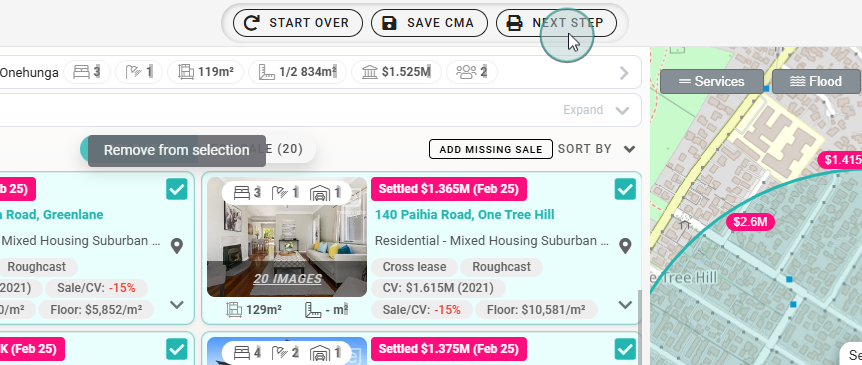
- Start a CMA: After selecting your comparable sales and listings, click "Next Step" to navigate to the Relab CMA Design Studio.
![An image showing filtering option, comparable listings and a Next Button on CMA view]()
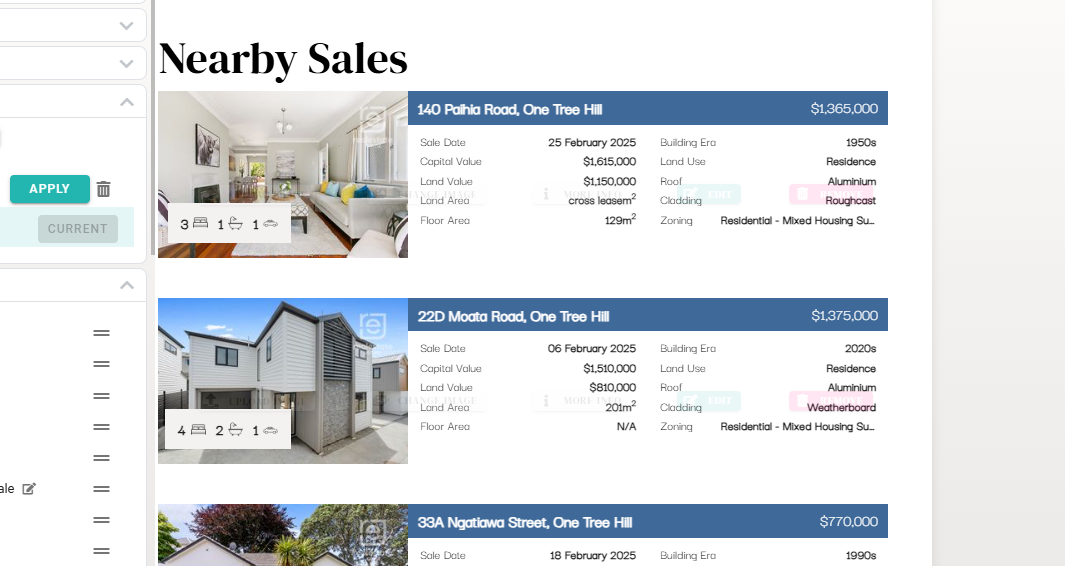
- Access Comparable Listings: Scroll down to the "Nearby Sales" section to view your selected comparable properties.
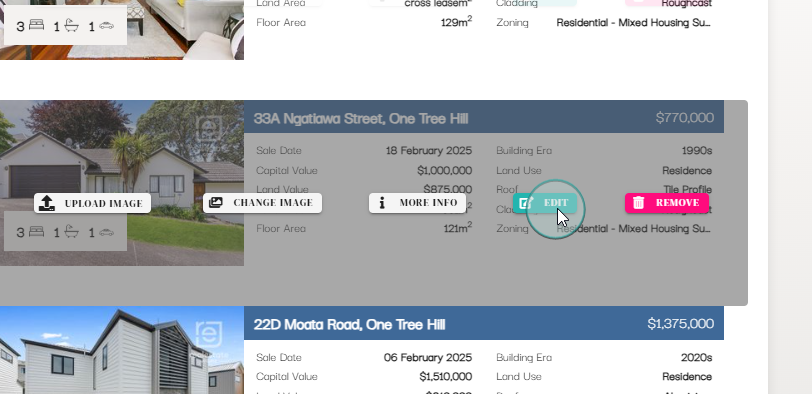
- View Listing Information: Hover over a property listing and click the "Edit" button that appears. A pop-up window will open containing three tabs.
![An image of Relab dashboard studio showing comarables property listings interactive buttons for managin listings including upload, edit, and remove.]()
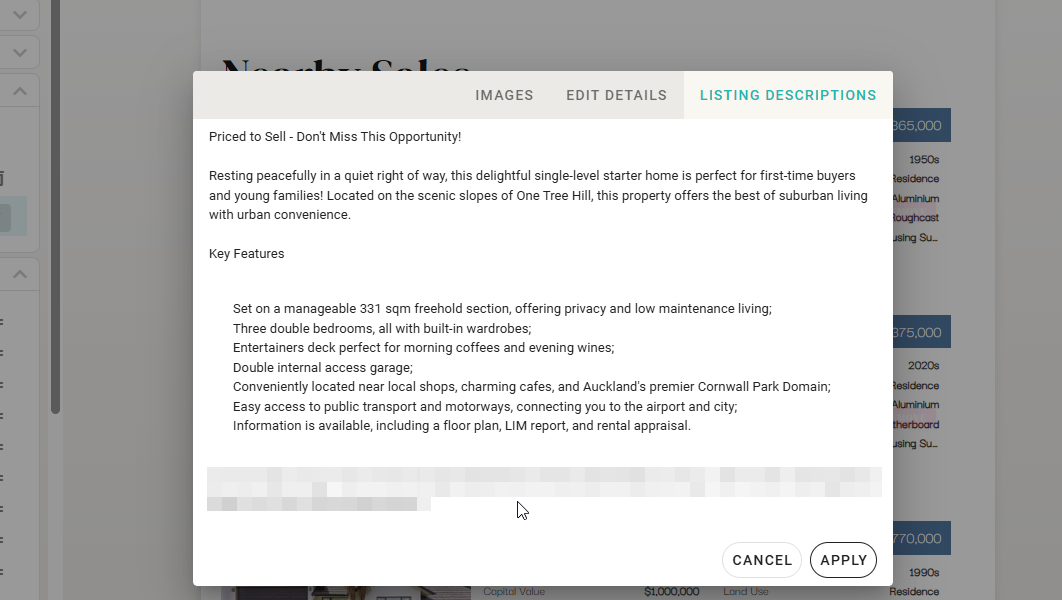
- Review and Extract Information: Examine each comparable sale listing description to identify key features, improvements, and selling points that support your comparison and value estimate.
![An image showing list description from comparable listings]()
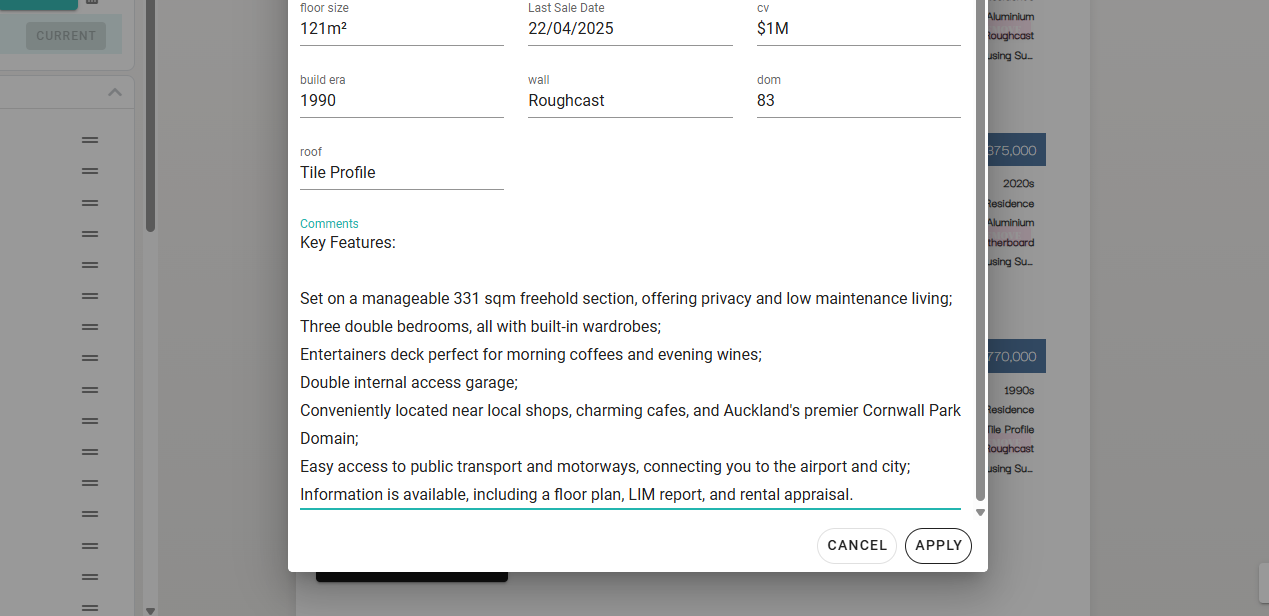
- Create Your Commentary: Copy the selected information into the comments field for each comparable, customising it to emphasise points most relevant to your client's property.
![Relab dashboard showing property details modal with specifications and key features including floor size, sale date, building information, and property highlights.]()
Practical Applications for Real Estate Professionals
Highlight Decision-Driving Features
Include specific details about renovations, zoning, or unique amenities that differentiated comparable sales in buyers' decision-making processes.For example:
"This comparable featured a recently renovated chef's kitchen with custom cabinetry and high-end appliances, similar to the subject property, which helps justify the comparable pricing."
Support Your Pricing Strategy
Share observations with clients about comparable properties and the features of these properties. For instance, you might note that a comparable property with a renovated kitchen and bathroom sold at a particular price point relative to the subject property, without suggesting a direct cause-and-effect relationship.Use Original Listing Language
Include relevant phrases from the original listing descriptions to show clients how similar properties were marketed. This provides additional context about comparable properties.Best Practices for CMA Report Commentary
Quality Control Checklist for Comparable Properties
- Verify information accuracy, especially for seasonal or time-sensitive features
- Watch for outdated information in older listings (note when renovations mentioned in older listings might now have different market value)
- Ensure consistent tone across all comparable commentary
- Focus on features most relevant to your client's specific property
- Keep commentary concise but comprehensive
Common Challenge and Solutions in CMA Reports
Missing Listing Descriptions
Some listing descriptions may be unavailable. In these cases, focus on the available data points and note the limitation in your report. Use other data points in Relab like photos, or key property or building features and your market knowledge to fill information gaps.Finalising Your CMA Appraisal with Enhanced Commentary
- Before sending your report to clients:
- Review all commentary to ensure key comparison points are clear
- Confirm all details support your estimated market value recommendation
- Check for consistency in terminology and feature descriptions
- Ensure your commentary provides useful context, not just property descriptions
Ready to Enhance Your CMA Reports?
Make your property appraisals more informative and efficient. Try Relab free with a 14-day trial and see how our CMA tools can help you make your comparative market analysis more credible.
Want to see the platform in action first? Book a personalised 20-minute demo to discover how Relab can improve your agency's workflow when creating comparable sales reports.